get latest games,softwares,tech news and much more from softechpark
Showing posts with label hacks and tricks. Show all posts

Tuesday, October 8, 2013

How To Disable Cut, Copy, Paste, Rename & Delete Of Files & Folders in any windows

How To Disable  Cut, Copy, Paste, Rename & Delete Of Files & Folders in any windows

Prevent is a free tiny portable tool that allows you to:
  1. Stop Cut
  2. Stop Copy
  3. Stop Paste
  4. Stop Rename
  5. Stop Delete
  6. Stop Copy To
  7. Stop Move to
  8. Stop Send To
  9. Disable Task Manager’s End Process button

How To Use:

First install the software prevent 1.0
2. Press your desired hotkey by which you will be able to deactivate the tool’s functionality.
3rd Click Activate

 All the above written functions will be disabled but still you can work with that  For example, you can still drag-n-drop to copy, paste & delete a file/folder and press F2 to rename a file/folder.
but please dont tell for who you want to prank .

.

Saturday, October 5, 2013

HOW TO REMOVE HIJACKED BROWSERS BY QVO6 OR OTHER SEARCH ENINES

HOW TO REMOVE HIJACKED BROWSERS BY QVO6 OR OTHER SEARCH ENGINES

when you open any browser and it takes to default page like qvo6 or snapdin or any other toolbars. after if set to default page to your home page and save settings also it will not work again it will  take to qvo6 here is how to remove that virus toolbars 


what this software does
Getting rid of annoying toolbars, browser add-ons installed with or without one's consent as well as eradicating adware or hijackers from a system can be a daunting job, especially if the appropriate tools are not at hand.

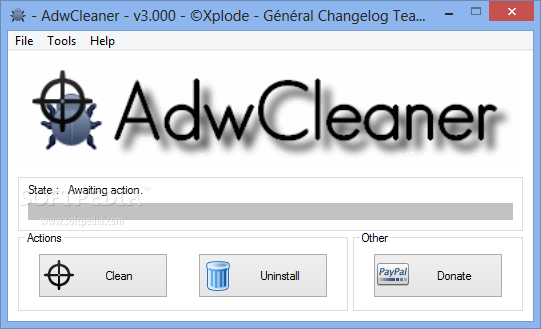
To help users clean their PCs of such nuisances, utilities like AdwCleaner have been created. This particular application is quite lightweight and also a breeze to use.

The program doesn't need installation and can be deployed from any storage device, most suitable for portable usage. As soon as it is started, AdwCleaner immediately finds all traces of unwanted components or remnants of former installations that should be cleaned.

The results are presented in a text document so you can view in detail which files and registry keys have been detected and proposed for deletion. Pressing the 'Delete' button will start the removal process which will end with a system restart.
just all u have to do is open the software and clean whatever it asks and restart your computer ..after restarting your computer your browser will take to default page


Wednesday, September 4, 2013

angry birds season and space and rio game hack

                         angry birds season hack download


When You use this cheat, if an explosion happens, You will usually be able to control another object like rocks etc.
This is useful if Your bird has exploded but You can still control an object to smash things.


Control Bird even after explosion:
This is basically the same option as the first one, with a "safety lock". Use it this way:
Hold down the Space button.
Launch the bird.
Release the space button.
Control the bird in the same way as in the first cheat.

If an explosion happens, You will still be able to control the bird unlike in the first option.
However if Your bird has exploded (like those exploding birds), You loose the benefits of controlling another object instead.


      Angry Birds Seasons +2 trainer      

Angry Birds Seasons +2 trainer for v3.0 and upwards


                                                                And for angrybirds  space hack

Angry Birds Space +2 trainer FIXED


Angry Birds Space +2 trainer for v1.3.1 and upwards

and if you want angry birds rio then just go for this link http://www.szemelyesintegracio.hu/cheats/38-pc-game-cheats/334-angry-birds-rio


First run the trainer.
Then run the game. (You can start the game with it's own icon or You can use the Start game button in the trainer.)
Hit the number keys on the keyboard to turn options on/off.
You can also use the checkbox to enable/disable the options.

There are 2 options in this trainer:

1. Control Bird
2. Control Bird even after explosion


NOTES:

The 2 options are not compatible with each other. Only one of them can be activated at the same time. If You wish to change
the cheat to the other one, disable the current cheat then activate the other one.


Control Bird: First activate the cheat. After You have launched the bird, You can control it with these keys:

U: Up
J: Down
H: Left
K: Right

When You use this cheat, if an explosion happens, You will usually be able to control another object like rocks etc.
This is useful if Your bird has exploded but You can still control an object to smash things.


Control Bird even after explosion:
This is basically the same option as the first one, with a "safety lock". Use it this way:
Hold down the Space button.
Launch the bird.
Release the space button.
Control the bird in the same way as in the first cheat.

If an explosion happens, You will still be able to control the bird unlike in the first option.
However if Your bird has exploded (like those exploding birds), You loose the benefits of controlling another object instead.


Wednesday, June 26, 2013

Desktop trick.


Desktop trick.


It is very interesting trick. You can apply it on your friend’s pc for joke. Your friend will be fooled whenever he tries to click any desktop icon. Follow these steps.
Copy your desktop by clicking “prtscn”.
Past it in paint program.
Save this file as JPG format.
Now open this image file and make it desktop wallpaper.
Right click on desktop, click on “arrange icon by”, now click on “hide  
desktop icon” to hide all the icons from your desktop
Now “unlock” the taskbar. Done.
Your desktop will be look like original but you can’t click on any icon.
Try it.

2nd  U Can’t create folder “CON”

Here is another interesting and amazing thing. You can’t create a folder with the name “con”. just can try it. I asked to many computer expert about this but they could not explain it.
to create con folder

hold the alt key and  type 255 or 0160 in num keypad only for desktop
 for laptop use charmap  or activate num keypad

INSTALL WINDOWS XP /7/ 8 FASTER


In this post I will tell you about installation of win XP in minimum time period. Normally when someone tries to install windows XP on computer, it takes around 30-40 min to complete entire setup. It is too much time to install windows setup. I will tell you a method to install windows more faster. It will take approximately 15 minutes to complete windows installation. So to install win XP in short time please follow these steps.


Power on your computer and start with bootable windows XP cd
In first step window will load installation files.
Select any drive ( C: ) for installation.
Select NTFS to format the partition.
Setup will copy files on this drive and it will try to restart PC.
After restarting when you see Xp logo, press (Shift+F10).
It will open (CMD) prompt.
In CMD prompt type (Taskmgr)
It will open task manager. Now go to “process” tab and find “Setup exe” Right click on setup.exe and select “Set priority”
You will see a submenu. Here priority will be normal. Select priority to (High)  or above (Normal).
Done.

This will complete installation process much faster than the normal original time.
Try it….......

in the above image i am selected firefox you pls search for setup while installing and set it to high priority